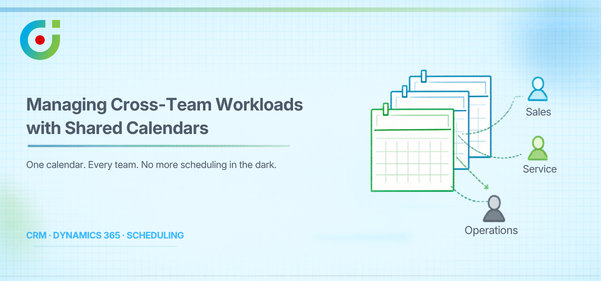
Most teams running on Dynamics 365 will tell you the same thing — it is where the work actually happens. Relationships, cases, deals, and follow-ups all live there, and over time, it quietly becomes the place everyone goes back to. What it doesn’t always give you is a way to see across your team, not just your own schedule, but everyone’s.
For instance, when sales are pushing towards the end of the quarter, service is drowning in open cases, and operations is trying to figure out who’s available. All they have is a calendar that only shows their own appointments, and that’s rarely the full picture. The more teams get pulled in, the messier it gets — some people are buried in work, others have barely anything on, and nobody finds out something slipped until it already has.
Traditional calendars were never really built for this. They were designed for one person managing their own day, not a group of interconnected teams working out of the same CRM. That’s the gap AppJetty’s Calendar 365 was built to fill. A shared, connected scheduling experience that lives right inside Dynamics 365, tied to the work your team is already doing every day.
Why Cross-Team Workload Visibility Matters in CRM
When you can’t see what other teams are dealing with, you’re essentially guessing. Here’s what that actually looks like. One team is overworked, missing things left and right. Another has capacity sitting completely unused because no one checked. For example, two people from different teams have booked a meeting with the same customer at the same time because their calendars cannot interact. And that might hamper productivity at work.
None of these is catastrophic. They won’t make headlines internally. But they add up — slowly grinding down productivity and leaving customers with an experience that’s just a little rougher than it should be, over and over again.
Shared Calendars in Dynamics 365 — and What They Should Actually Do in CRM
Your personal Dynamics 365 calendar is basically a to-do list with timestamps, but a shared calendar is a different thing altogether. It’s how your whole team stays on the same page without having to ask around. Here’s what that actually looks like in practice:
- Meetings, tasks, calls, and appointments all in one place instead of spread across five different tools
- Every entry connected to something real — a case, a deal, a service request, a project — so nothing gets lost without context
- Anyone’s availability right there when you need it, without having to chase anyone down
A shared calendar in a CRM should also tell you where work is piling up, who has room to take something on, and whether the person you’re about to assign something to is already stretched thin.
The built-in Dynamics 365 calendar is really not for that. For that, you need Calendar 365, which brings shared visibility to your whole team without anyone having to leave the platform.
| Expert Tip: When using Calendar 365, take advantage of its entity-based views to connect scheduled activities directly to CRM records like cases or projects. It sounds like a setup detail, but it means your team always has the “why” behind every appointment visible at a glance — no digging through records to remember what a meeting is actually about. |
How Dynamic 365 Shared Calendars Help Balance Cross-Team Workloads
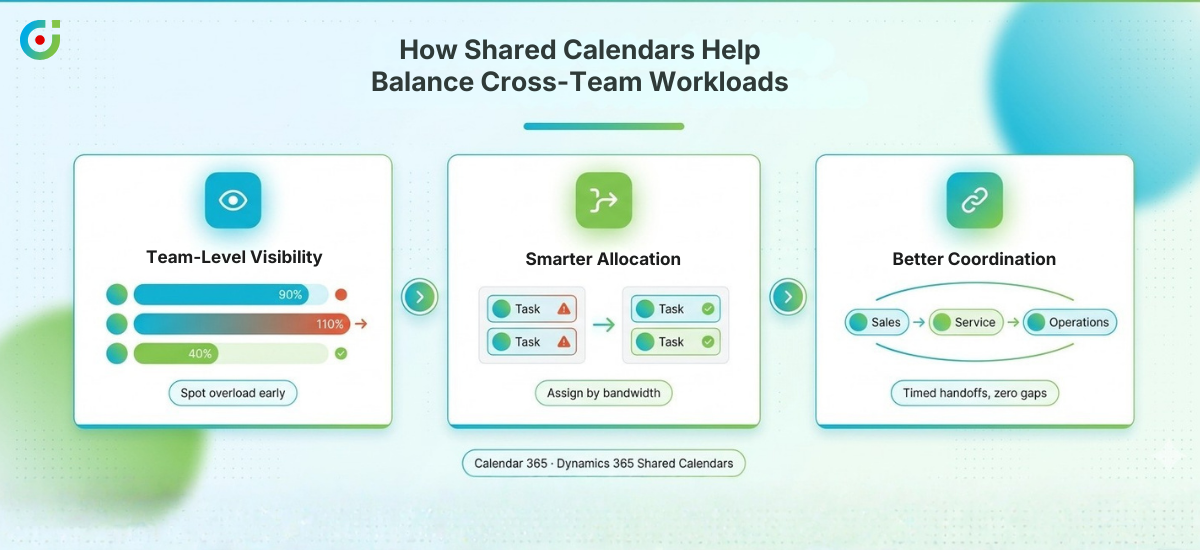
With Dynamics 365 shared calendar, getting workloads under control doesn’t require a big operational shake-up. Usually, it just comes down to making the right things visible before they become problems.
Team-Level Visibility
Most managers don’t find out someone is overloaded until something gets missed. With Calendar 365, you get a clear picture of how work is spread across your team. You can also view multiple calendars across users and departments, all in one place.
That means you catch capacity issues early, before they turn into something harder to fix. You also stop assuming you need to hire when someone already has the capacity. Fewer things catch you off guard, and that alone changes how a team operates.
Smarter Task & Appointment Allocation
A lot of scheduling decisions happen fast and without much context. Someone needs to be assigned something, and it goes to whoever’s name comes to mind first — that works until it doesn’t, and suddenly one person is buried while someone else has barely anything on their plate.
Before you assign anything, Calendar 365 shows you exactly where everyone actually stands. Shared calendars give you an honest picture of who has room and who is already running at full stretch, so work goes to the right person for the right reasons — not just the obvious one.
Better Coordination Between Teams
When sales, service, and operations are working off different schedules, things fall through the cracks. And the space between teams is usually where the most important details get lost. Calendar 365 gives every team a shared view so handoffs don’t turn into follow-up emails and missed connections.
And once everyone is working off the same schedule, blind spots become visible before they cost you anything. Work moves from one team to the next without anyone having to chase each other down.
Supporting Multiple Teams with One Calendar System
What makes AppJetty’s Calendar 365 really useful is its ability to accommodate its users, and teams really do use it differently. You can view multiple calendars in Teams, and different teams tend to use them in very different ways.
Sales teams use them to monitor follow-up timing, ensure that nobody demos at the same time, and that high-value leads aren’t lost in the mix. Service teams use them to ensure that appointments are spread out equitably, that case timing is respected, and that their agents are not overloaded with too many appointments.
Marketing teams use them to ensure that activities align with what their sales and service teams can actually deliver, not just what looks good on a marketing timeline. And managers get the overview they actually need, capacity, availability, workload distribution, without having to send a round of “what are you working on this week?” messages.
What prevents this from turning into a massive, crowded mess is role-based visibility. Instead of seeing everything that is happening throughout the entire company, everyone may see what is pertinent to them. It is accessible because of this.
Managing More Than Meetings: Activities & Entity Calendars
If your calendar only shows meetings, you’re only seeing part of the story. On any given day, there are calls to make and tasks with deadlines that can’t move. And more often than not, follow-ups get assigned and then quietly forgotten because nobody can actually see them. A calendar that only tracks meetings misses all of that, and in a CRM environment, that kind of invisibility is exactly what lets a deal slip before anyone notices.
A good CRM calendar surfaces the full range of work: tasks, calls, appointments, and activities. Even better, it shows them connected to the records they’re related to, the open case, the active project, or the service request that’s been pending for two days. That’s exactly what Calendar 365 is built for. It lets your team see operational work in the context it actually lives in, not pulled out of it and dropped into a list. That’s what makes it feel manageable rather than arbitrary.
Reducing Manual Coordination and Scheduling Errors
Most scheduling problems don’t announce themselves — they just quietly eat into the day. It starts with an email chain that takes hours to find a slot everyone can agree on. That turns into a status meeting that only exists because no one could see what anyone else was doing. And somewhere along the way, an overlap slips through because two people were updating two different things at the same time.
AppJetty’s Calendar 365 cuts through most of that by bringing availability and scheduling into one place. The back-and-forth stops being necessary, and conflicts get caught before they turn into problems. And because everything is inside Dynamics 365, there’s one source of truth everyone works from.
Managerial Benefits: Better Planning and Decision-Making
Managers usually learn that a team is overwhelmed just about the time it’s already causing damage. That’s because by then the delay has already occurred, the customer is upset, and the response comes after the fact.
The shared calendar changes this. You can view multiple calendars in Teams, see the full workload, and respond to it in real time. That’s no longer based on intuition; it’s based on what’s really going on. You might think this is a minor process change, and you’d be right. However, if you’re a manager responsible for keeping multiple teams running, you know this is a significant change in how you operate.
Turning Shared Visibility into Better Outcomes
Scheduling problems rarely feel like big problems until they are. A missed handoff here, an overloaded team member there, a customer who waited longer than they should have — it adds up quietly, and by the time something needs to change, it’s usually been going on longer than anyone realized.
That’s where AppJetty’s Calendar 365 comes in. When your team can actually see who’s doing what and where the gaps are, work gets distributed more evenly, fewer things fall through, and teams stop stepping on each other’s toes without meaning to.
And for teams that need to go further, Calendar 365 brings entity-based views, role-specific visibility, and a scheduling experience built for the way CRM teams actually work. Most teams don’t realize how much simpler things could be until they’re already on the other side.
If scheduling still feels harder than it should, see how Calendar 365 can help you.