How to Enable/Disable User Wise Configuration Setting in Calendar 365

How to Enable/Disable User Wise Configuration Setting in Calendar 365

Maulik Shah

July 21st, 2022

User configuration settings lets you configure the Calendar settings for each individual users. Individual users can manage the settings as per their requirements. Here is how you can enable the User Wise Configuration in the Dynamics 365 Calendar.

Create User Configuration :

Step 1: Go to the Setup tab ➤ Calendar Settings, enable the User Configuration.
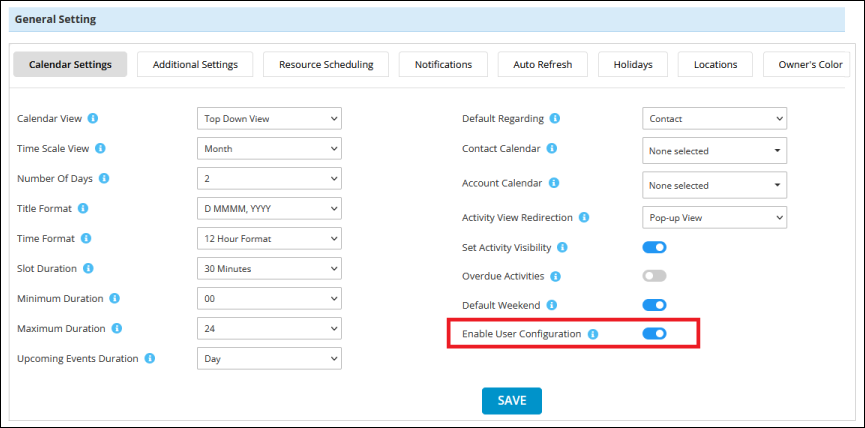
Enable the User Configuration
If you enable this option then user configuration will be considered and if you disable this configuration then global configuration will be considered for the calendar setting.

Step 2 : First you need to enable the user configuration option from default configuration and you can see the “Configuration All User” in the User Calendar Configuration tab under Configuration & Report.

Click on this button and all users configuration will be created which has AppJetty calendar role or system administrator role. You will see the list of user configuration here.
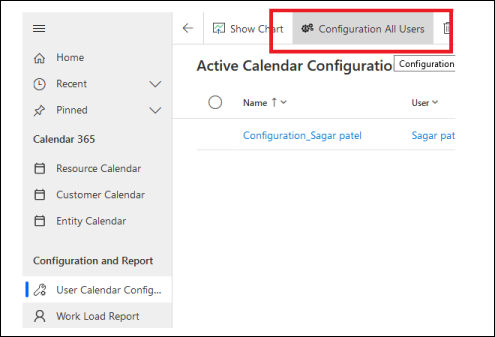
Configuration All User
 

All product and company names are trademarks™, registered® or copyright© trademarks of their respective holders. Use of them does not imply any affiliation with or endorsement by them.
Read Related Blogs About Calendar 365

Solving Resource Management Challenges with Calendar 365’s Resource Calendar

Solving Resource Management Challenges with Calendar 365’s Resource Calendar

6 Min
How Calendar 365 Can Streamline Scheduling for Technology Firms with Dynamics 365

How Calendar 365 Can Streamline Scheduling for Technology Firms with Dynamics 365

5 Min
How Can Calendar 365’s Resource Calendar Optimize IT Resource Scheduling and Utilization

How Can Calendar 365’s Resource Calendar Optimize IT Resource Scheduling and Utilization

7 Min