As the network grows across cities, countries, and continents, operations quickly shift from adding another location to managing the existing ones intelligently. Whether it is about implementing smart locker networks, EV charging grids, parcel pickup hubs, or any other distributed infrastructure, operation complexity multiplies as the network expands.
Most organizations rely on Microsoft Dynamics 365 to manage locker records, service requests, and field activities. While Dynamics 365 handles structured data well, traditional list views and static dashboards struggle to convey spatial context. Thousands of locker locations appear as rows rather than their real-world positions. As a result, assessing coverage gaps to plan regional workload or improve technician routes becomes difficult.
This disconnect becomes more visible as smart infrastructure models expand. Decisions around inspections, servicing frequency, and site expansion increasingly depend on location intelligence. Without a native way to visualize tasks and resources geographically, even well-structured CRM data loses operational value.
This is where geo-mapping inside Dynamics 365, combined with calendar-driven task planning, becomes a foundational requirement rather than an enhancement. A dedicated Dynamics 365 mapping tool can bridge this gap effectively.
How MappyField 365 Enhances Smart Locker Operations
At present, the global location intelligence market size is estimated to reach USD 53.62 billion by 2030 due to the rise in use of IoT devices and network enhancement systems (source). AppJetty’s MappyField 365 allows Dynamics 365 users to leverage similar systems and convert CRM records into actionable geographic insights.
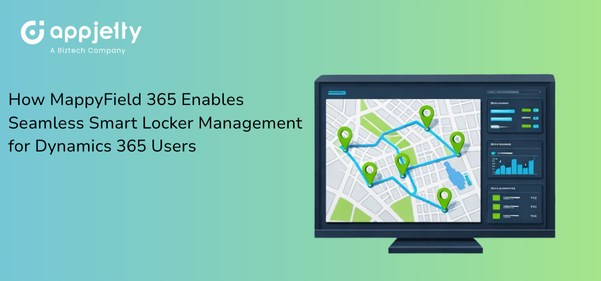
For smart locker operators, MappyField 365 can transform how locker locations, inspections, technicians, and service routes are planned and executed. So, instead of navigating between CRM records and external mapping tools, teams can integrate MappyField to work directly within Dynamics using interactive maps that reflect real-world conditions.
By combining advanced geo-visualization with task and territory context, MappyField 365 facilitates smart locker management and long-term locker network planning. Locker installations, servicing schedules, and inspection workflows can be evaluated geographically. Thereby, improving both operational efficiency and strategic decision-making.
Key Capabilities that MappyField 365 offers:
- High-volume location plotting for large locker networks
- Multi-dataset mapping for lockers, technicians, and inspection records
- Territory management for inspection and service teams
- Proximity search for faster dispatch decisions
- Route planning for technicians and installers
- Embedded maps inside Dynamics records and forms
As a Dynamics 365 mapping tool, MappyField 365 extends native CRM capabilities and supports data-driven execution without disrupting existing workflows.
Key Features of MappyField 365 that Improve Smart Locker Network Planning Efficiency
To elaborate further on how MappyField enhances Dynamics 365 capabilities for smarter locker management, here are some of the MappyField 365 features explained.
Large-Scale Locker Network Visualization
Problem: Smart locker companies often manage hundreds or thousands of locker locations. Standard Dynamics 365 views present these records as lists. This makes it difficult to get insight into spatial density, regional distribution, or service coverage gaps.
Solution: MappyField 365 supports high-volume plotting using clustering, categorized pins, and optimized rendering. Organizations can implement these visualization layers to display locker locations dynamically on maps, allowing teams to explore the network without performance limitations.
Impact: Teams will gain immediate geographic clarity. Network density will be visible, underserved areas will stand out, and expansion planning will be data-backed—leading to faster rollout and improved coverage accuracy.
Multi-Dataset Mapping for Strategic Expansion Planning
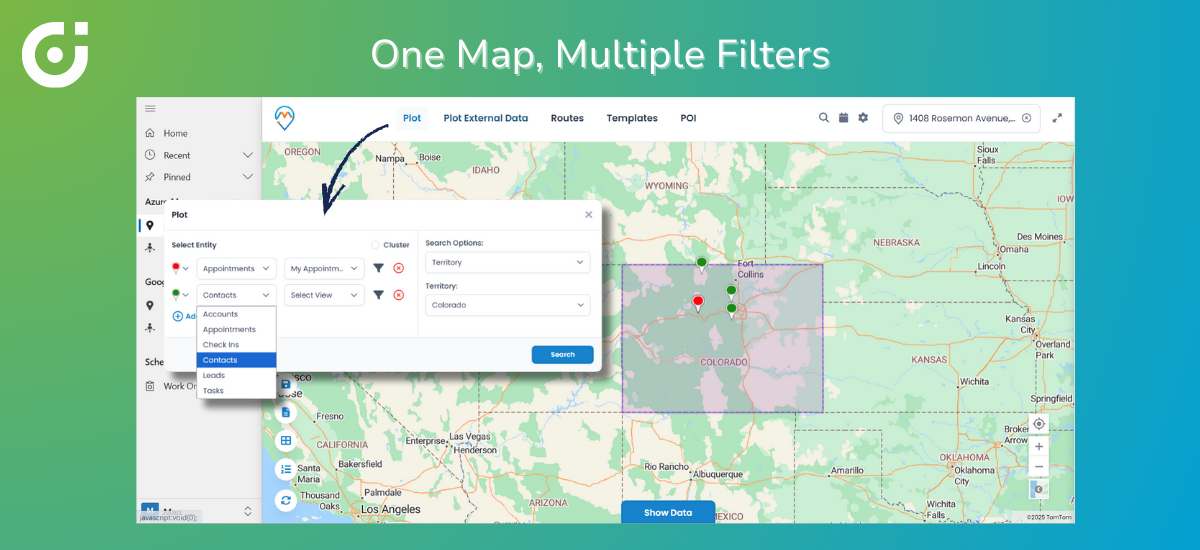
Problem: Selecting new locker installation sites requires comparing internal networks with competitor locations, public infrastructure, and regional density patterns. Standard Dynamics 365 views cannot overlay multiple datasets on a single map, leaving planners to work with fragmented information and assumptions.
Solution: MappyField 365 enables multi-layer mapping by combining internal Dynamics 365 records with external datasets uploaded via CSV files. Teams can visualize multiple data layers on a single interactive map and apply filters by region, site status, ownership, or other attributes—allowing planners to assess site suitability directly within Dynamics 365.
Impact: Expansion decisions will become data-backed rather than guesswork. Organizations will be able to identify high-potential zones faster, avoid oversaturated areas, and reduce deployment costs. This will improve both market coverage and ROI.
Territory Management for Inspection and Maintenance Teams
Problem: Inspection and maintenance activities span regions, cities, and service zones. Without visibility into geographic territories, managers often struggle to track their team’s assignments, progress, and workload balance.
Solution: What MappyField 365 will do is provide territory visualization with color-coded boundaries and assignment views. So managers can visualize territories, assess inspection status, and view technician responsibilities directly on the map.
Impact: Inspection cycles will accelerate, overlaps will be eliminated, and service accountability will improve, leading to consistent locker availability and reduced operational friction.
Proximity-Based Search for Faster Service Dispatch
Problem: When lockers require urgent servicing, dispatching the nearest available technician is critical. But due to a lack of visibility and a proper system in place, the response gets delayed, and travel costs increase as decisions are made on guesswork.
Solution: Proximity Search identifies the nearest technicians or assets using geocoded CRM data. Combined with route planning, it supports faster dispatch decisions. So dispatchers can implement this feature to make assignment decisions in seconds rather than minutes. This will reduce service response time, improve technician productivity, and minimize downtime.
Embedding Maps Directly Inside Dynamics 365 Forms
Problem: Switching between CRM screens and external map tools disrupts workflows and often leads to errors, especially during inspections and servicing. As a result, none of the resources can support your workflow as they should.
Solution: MappyField 365 will integrate directly with Dynamics 365 via the API and plot locker records, inspection forms, and service tickets based on the filters applied by the team. This will allow them to operate with complete spatial awareness and make decisions faster with better coordination, and implement smoother execution for smart locker management.
What a lot of clients ask here is, “Can MappyField 365 support thousands of locker locations without slowing down Dynamics 365?” to which the experts say, “Yes. MappyField 365 is designed for high-volume datasets and uses clustering, optimized rendering, and filtering to ensure performance remains stable—even when visualizing thousands of locations simultaneously.”
How MappyField 365 Transforms Smart Locker Operations
To sum it all up, here’s how organizations can benefit by integrating MappyField for their Dynamics 365 CRM environment.
- Faster expansion through accurate site evaluation
- Higher technician productivity via field service route optimization
- Reduced locker downtime with quicker dispatch
- Clear geographic insights for leadership teams
- Improved competitive and territory analysis
- Lower operational costs from reduced travel
- Streamlined workflows within Dynamics 365
By supporting field service route optimization and spatial task planning, MappyField 365 will create a connected operational ecosystem where location data actively drives outcomes.
One question that often comes from the clients is, “Will MappyField 365 replace the existing Dynamics 365 workflows?” And the answer is no. MappyField 365 only enhances the existing workflows; it does not replace them. It works as a Dynamics 365 mapping tool that adds geographic context to the entities, records, and processes in your existing CRM, without disrupting the setup.
Why Smart Locker Networks Need MappyField 365
Smart locker networks depend on precision and information, such as where assets are placed, how they are serviced, and how teams are deployed, which are crucial. Standard Dynamics 365 tools manage records effectively but lack spatial visualization and mapping capabilities.
MappyField 365 fills this gap by delivering advanced mapping, territory visualization, proximity search, and route planning directly inside the Dynamics environment. Organizations can implement this Dynamics 365 mapping tool to gain the spatial context that traditional CRM views simply cannot provide.
For teams focused on scalable smart locker management and sustainable smart locker network planning, MappyField 365 enables intelligent decisions, efficient field operations, and controlled network growth without leaving the Dynamics ecosystem.
Curious to see how MappyField 365 can transform your smart locker operations?