The real estate software market is expected to grow at a CAGR of 11.3% from 2024 to 2030, reaching a market value of USD 21,766.9 million (source). But why are there so many software solutions and technology integrations for a manual, process-intensive industry?
Because running a real estate company means keeping track of scattered properties, tenants’ requests, inspections, compliance deadlines, and coordinating with contractors. This is a challenging task, and CRM solutions like Dynamics 365 help streamline it.
Dynamics 365 allows users to consolidate all information into a centralized system; however, it falls short when it comes to visualizing this data. While users can store all their data in the system, the native calendar limits the ability to visualize multiple entities in a single calendar interface.
And this is where Calendar 365’s entity calendar comes into the picture. It takes all those entity records sitting in your system and displays them on one visual calendar. It allows teams to gain centralized visibility across entity-based schedules, making daily operations more predictable and controlled.
Common Problems Real Estate Teams Deal With
The first step is always to get an idea of what their operational roadblocks are. Why is this important? Because that allows you to get the solution that perfectly aligns with your workflow and enhances it. Here are some of the commonly occurring problems that real estate businesses face:
- Schedules That Overlap Without Warning – When your property details, maintenance visits, tenants’ information, and contractor work are scattered, schedule management becomes challenging. You end up missing deadlines, people get frustrated, appointments overlap and nobody is happy.
- Uneven Workload Distribution – Lack of visibility makes everything more challenging. One inspector gets seven site visits while another gets just one. Manual scheduling takes forever, and rescheduling them gets even more complicated, and the balance amongst the team is rarely met.
- Teams Working in Silos – The disconnect between the real estate CRM and the teams makes collaboration difficult. So leasing doesn’t know how many maintenance resources are available, which makes collaboration difficult and creates unnecessary back-and-forth.
- Compliance Deadlines That Slip Through – Data belongs in spreadsheets, deadlines belong in your CRM ecosystem, and that is because spreadsheets don’t alert you in case of a missed deadline. So, the older system isn’t able to keep pace with the current demands.
- Tenant Appointments Clashing With Internal Work – Overlapping repair day with move-in schedules? Or inspection with contractor work? This is the kind of scramble that becomes a common thing when there is no cohesive visualization of every resource’s schedule. Scheduling becomes an invisible road to chaos when it is poorly managed.
The thing is, most real estate doesn’t have a scheduling problem; they have visibility issues. The data already exists in the Dynamics 365 ecosystem. Hence, the gap is the inability to observe it all as a cohesive whole in one place, and this is precisely what Calendar 365’s Entity Calendar aims to resolve.
See how entity calendar creates an additional layer on top of your existing CRM and integrates seamlessly into your workflow.
How Entity Calendar Tackles These Issues
Calendar 365 adds visual scheduling and entity-based calendar management directly into Dynamics 365. Here’s how it addresses each problem.
A. Catching Schedule Conflicts Before They Cause Problems
The Issue: Property managers cobble together information from different screens. This is because inspections live in one place, maintenance tasks live in another, tenants information and appointments are in a different place. The issue is, this silently turns into a conflict until it becomes evident.
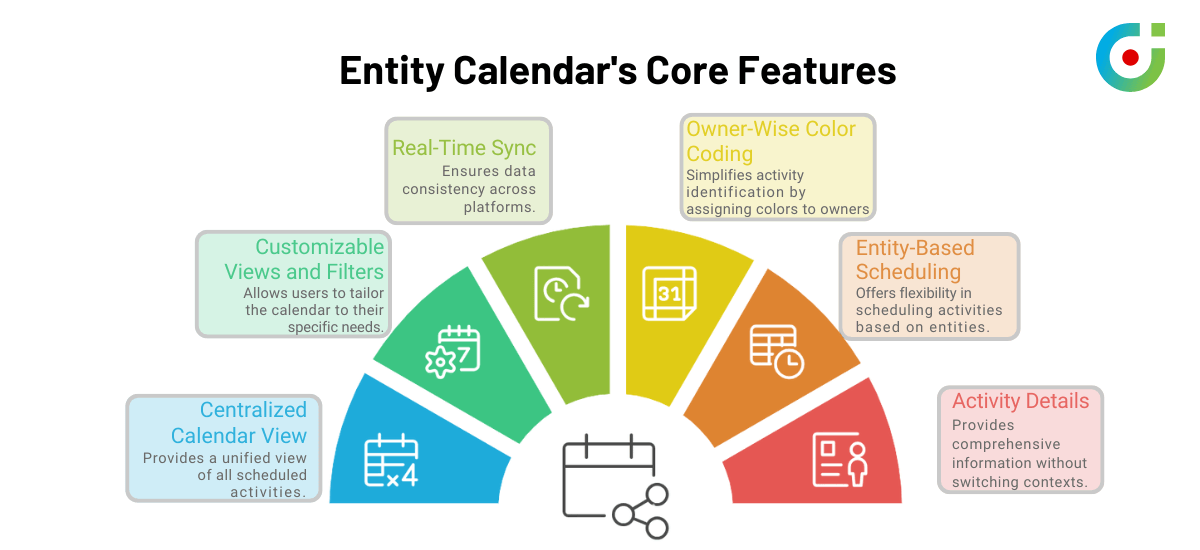
What Entity Calendar Does: It pulls either inspection tasks, maintenance work, field visits, or recurring events onto a visual calendar based on whichever one you want to prioritize. You pick your view—day, week, month, timeline—and see workload patterns immediately. Color-coded events make crowded dates stand out.
For Instance: If two big maintenance jobs accidentally end up scheduled for the same building on the same day. With Entity Calendar, both will show up clearly on the screen. The manager can spot the problem, moves one job to the next day, and avoid the mess before it happens.
For teams using a real estate appointment scheduler, this visibility makes a real difference.
B. Balancing Workloads For Staff
The Issue: Lack of proper visibility shows up as workload imbalance. This is because managers have no idea who is occupied and who is not. The work gets assigned based on mere guesswork instead of being a well-thought-out decision.
What Entity Calendar Does: A color-coded view of all tasks by status and priority helps managers see how busy the calendar is for their teams. This helps them identify the imbalance and manually redistribute assignments. They don’t have to hover over every task to see how many tasks they can reschedule and to what extent.
For Instance: At a glance, the Calendar shows six yellow colored tasks and two green colored tasks. The manager doesn’t have to open every task; they just look at the calendar and notice that yellow tasks cannot be rescheduled, while green tasks can be rescheduled if needed. They can simply reschedule the tasks in real estate scheduling software to balance the workload.
This kind of workload visibility is exactly what real estate appointment scheduling software should provide.
A lot of teams often ask if Entity Calendar assigns tasks automatically. It doesn’t—and that’s intentional. Real estate scheduling involves too many variables that only a human understands: tenant preferences, contractor availability, building access restrictions. What the calendar does is show you the full picture so your decisions are informed, not guesswork.
C. Getting Teams on the Same Page
The Issue: Leasing, maintenance, property management, and legal teams operate independently. Nobody shares a unified schedule. Properties sit vacant longer than they should because handoffs keep getting delayed.
What Entity Calendar Does: It fetches and displays tasks from multiple Dynamics entities—Properties, Tenants, Inspections, Work Orders, Maintenance Requests—on one calendar. Teams filter by what matters to them while still seeing the bigger picture.
For Instance: Cross team visibility plays a significant role in streamlined operations. Let’s say leasing teams checks calendar and notices that maintenance team is finishing the repairs tomorrow and based on that schedules a tenant visit for the day after. No overlapping, easy property maintenance and viewing, better results.
D. Keeping Compliance Deadlines Visible
The Issue: Renewal inspections, documentations, deadlines, and safety checks get buried in lists that nobody opens regularly. This more often than not leads to missed deadlines and compliance complications. And, by the time you remember, the due date is just a few days ahead.
What Entity Calendar Does: Teams configure recurring compliance activities at the entity level, which then appear consistently on the calendar. These show up alongside everything else, so nothing falls off the radar. All the information gets aligned in one unified interface.
For Instance: A company conducts bi-annual safety inspections and adds it as a recurring event. When the date gets close, it’s right there on the calendar for everyone to see. Inspection gets done on time without the usual last-minute panic.
Avoiding compliance penalties alone makes this feature worth having on your real estate appointment scheduler app.
E. Aligning Tenant Schedules With Internal Work
The Issue: Tenant move-ins, repair appointments, and inspections clash with internal operations. Lack of proper communication and accessible information always leaves someone surprised.
What Entity Calendar Does: Once tenant-related entities are configured and mapped, their events appear alongside internal maintenance and inspection schedules. Teams see both and plan accordingly. This ensures teams have the visibility needed to prevent overloads and overlaps through informed scheduling decisions.
For Instance: Let’s say a property where tenants are supposed to move in by Friday will give the maintenance team visibility into their own deadlines. They will ensure that all repair work is completed before tenants move in and that the handover doesn’t include any unpleasant surprises.
F. Managing Multiple Properties Without Losing Track
The Issue: Schedules across different buildings, regions, and portfolios get overwhelming fast. Finding relevant information takes too long. This is because of data being scattered across multiple platforms and spreadsheets that no one can find.
What Entity Calendar Does: Day, week, month, and timeline views combine with filters for property, region, entity type, owner, and status. Teams zoom in or zoom out depending on what they need.
For Instance: Regional manager filters for “Los Angeles Properties” only. Every inspection, repair, tenant appointment, and compliance deadline for that region appears instantly. Prioritizing becomes straightforward.
For companies managing growing portfolios, this filtering saves hours every week.
What Teams Actually Gain by Investing in a Real Estate Scheduling Software
- Everything in One Place: Property tasks, inspections, maintenance, tenant appointments, compliance events—all visible on a single calendar. Less clicking around. Fewer things falling through cracks.
- Smarter Resource Allocation: Color coding reveals workload imbalances at a glance. Managers redistribute tasks without spreadsheets or guesswork.
- Teams That Actually Coordinate: Shared calendar visibility connects leasing, maintenance, legal, compliance, and operations. Handoffs happen faster. Property turnaround improves.
- Compliance That Stays on Track: Recurring tasks and legal deadlines remain visible. Nothing gets forgotten until the last minute.
- Happier Tenants When schedules align and properties get prepared efficiently, tenants notice. Faster responses, clearer communication, smoother experiences overall.
Now, a lot of real estate business owners get a lot of questions when it comes to entity calendars, questions like,
“Will it work with our existing Outlook and Google Calendar integrations?”
Calendar 365 syncs automatically with D365 CRM, so if your CRM is integrated with Outlook, you can connect it to Calendar. As for Google Calendar, since it is not part of the Microsoft suite, users won’t be able to connect to the entity calendar, but to make it easy for external users, only the booking link can be synced.
“What if our Dynamics 365 setup is heavily customized?”
Then, too, the entity calendar will work equally best for your system. The calendar works with custom entities and not just the out-of-the-box ones. So every custom field for properties, inspections, or maintenance requests can show up in your calendar as well. During implementation, we map your specific entity structure to the calendar views.
Wrapping Up
Entity Calendar brings structure to real estate operations once entities, views, and permissions are properly configured. Teams coordinate better, properties turn over faster, and compliance stops being a fire drill. It’s a practical way to transform fragmented schedules into a structured, centralized operational system that supports growth.
Whether you use Dynamics simply as the CRM it is, or customize every possible field for your business model entity calendar helps you turn your potential reserve into actual revenue. So an entity calendar not only gives you visibility but also becomes the key to helping you achieve growth and success.
Want to see how it works for your team?