Your Dynamics 365 environment contains all the data you need to streamline your delivery process. This includes everything from warehouse records to delivery addresses, order history, and more. That’s not the tough part to manage. The actual challenge is pulling this data from the CRM and plotting it on a map.
And multiplying it by your entire customer base for all your warehouses? The volume alone turns it into a massive undertaking. You’ll quickly realize that an address is just text. It tells you nothing about where something actually is, how far it is from your stock, or whether the route you’re imagining makes any sense before a truck leaves the building.
So what happens next? Someone makes a decision based on what worked last week or last month. And the results? A truck running a longer route than it needed to, and a warehouse getting deliveries that another facility could have handled efficiently.
These things rarely surface as the root cause but are actually the major factors behind errors, backlogs, and delays. Here, the problem is not the lack of data but the absence of context for it. Your team knows the locations, destinations, and other variables, but they just can’t piece them together.
What you need is not another system to manage logistics but geographic intelligence that can help your team make smarter, data-driven decisions. And, Dynamics 365 map integration can make that happen. When you can view your data as locations and routes on a map, data becomes information, and guesswork turns into data-driven decisions.
Planning Daily Warehouse-to-Delivery Routes: Challenges and Solutions
Take a distribution operation with a few warehouses and a large expanse of delivery network to manage. The Dynamics 365 ecosystem manages all the data the team can access to determine which deliveries are close to which facilities, whether planned routes will work, and where demand is clustering.
Everything is working fine; no one is questioning whether the system is efficient enough or what can be improved, etc., as they are busy mapping out their day. But here is the thing: organizations that operate at such a scale can actually implement better location intelligence. That too, without rebuilding their whole infrastructure from scratch.
The concept of location intelligence isn’t very new either. It is a growing field, estimated to reach USD 74.81 billion by 2035 (source). The growing trend is a clear indication that businesses are grasping and integrating new technology into their day-to-day operations.
This is where Dynamics 365 map integration comes into the picture. This one simple integration can add to your business in multiple ways, from smarter task allocation to better route planning and improved strategies. And if you are looking for one such solution, then AppJetty’s MappyField 365 can be your answer.
Problem 1: Warehouse and Delivery Locations Exist Only as Text
Inside Dynamics 365, a warehouse address and a delivery destination address are both just records. They’re accurate and stored correctly. And they have no spatial relationship to each other whatsoever.
When a planner is looking at an order batch and has three warehouses to choose from, they’re working with location data that doesn’t tell them anything about location. Which warehouse is actually closest? Is there a cluster of deliveries near one facility? Are two destinations that seem unrelated actually five minutes apart?
You can’t answer any of these questions from a list of addresses. So planners estimate, assume, and rely on whoever’s been doing this the longest. And as a result, inefficient assignments build up quietly over time.
Solution 1: Visualizing Warehouses and Delivery Locations on Maps
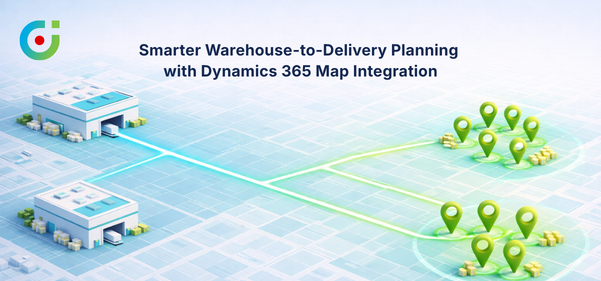
Geocoding the existing address records is not complicated, however, the insights it unlocks are very significant. Organizations can implement this so all the warehouses and delivery destinations will show up as pins on a live map right in the Dynamics 365 ecosystem. No need to switch tabs or copy-paste data into a separate tool.
Planners will stop reading and start visualizing, so the delivery concentration in a given area becomes obvious. The geographic relationship between a warehouse and a cluster of destinations is something you can look at rather than calculate mentally.
Teams can implement smarter warehouse-to-delivery matching, reduce the manual distance-checking that eats up planning time, and start grounding assignment decisions in actual spatial context rather than rough estimates.
Problem 2: Manual Route Planning Without Location Intelligence
Route planning outside Dynamics 365 is more common than most operations would want to admit. Spreadsheets and consumer mapping apps exist because the core system is not able to deliver planners a visual way to think about routes.
The problems that come with this aren’t very dramatic in the beginning, like a delivery sequence that looks good on paper, but in reality involves so much unnecessary backtracking. Translating the data into actual locations manually, without a proper map, takes longer than planned.
All this adds to the delays, tasks start piling up, and without proper visibility, there is no means to trace the information back. So there is no way to know how a decision was made or whether there are any errors to avoid.
Solution 2: Route Planning Using Dynamics 365 Map Integration
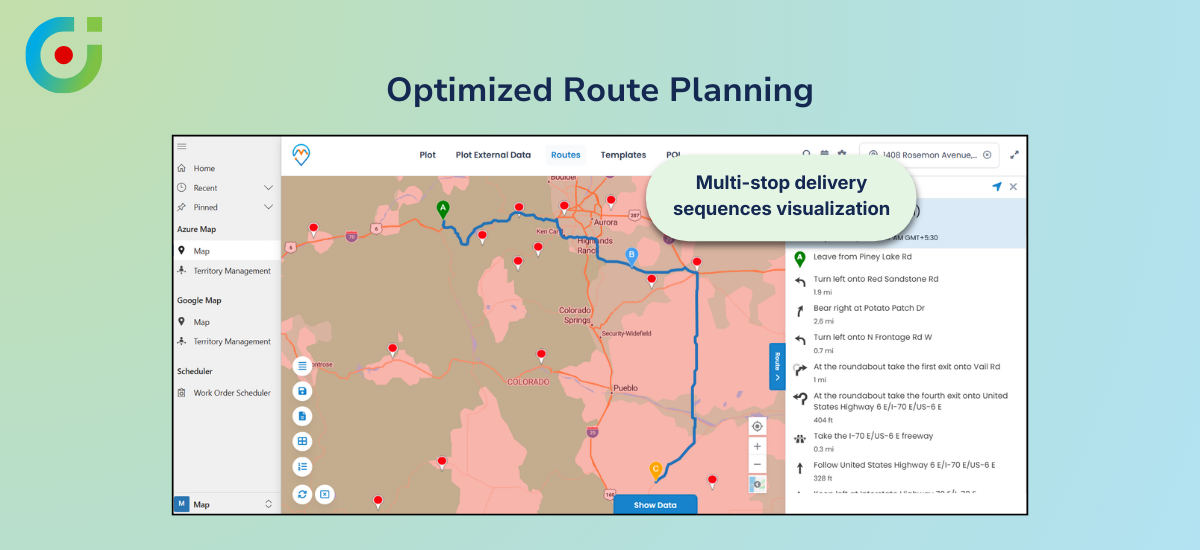
With CRMJetty’s Dynamics 365 map integration, organizations can implement map-based route planning directly in the CRM ecosystem. They can arrange multi-stop delivery sequences visually, watch the travel path take shape as stops are added, and compare route options by distance and layout using integrated map services.
Map integration doesn’t replace the dispatch judgment. The key difference is that whoever will be making those calls won’t be doing it half-blind. There’s a real map in front of them, showing the actual path, and if two options are on the table, both can be considered before one is chosen.
The map doesn’t take away anyone’s autonomy, rather, it adds an additional layer of intelligence. It makes visualization easier; addresses no longer remain just a series of texts, but actual locations that make the planning process a little less daunting.
Problem 3: Difficulty Defining and Managing Delivery Zones
In most operations, delivery territories aren’t really defined, they’re understood. The long-tenured dispatcher knows which warehouse handles which area. It’s written down somewhere, or it exists as institutional knowledge that gets passed along informally. Either way, it’s not in the system where daily planning actually happens.
This eventually leads to workload imbalance. Some zones are consistently overloaded, while some are not. This is not a deliberate decision, but due to the lack of proper structure, no one is able to pinpoint the actual issue.
When someone joins the team, they get a vague idea about the workload instead of well-assessed and data-backed information. Eventually, when things start to pile up, these minor points turn into bigger, more complex issues.
Solution 3: Territory and Coverage Mapping
Organizations can implement territory mapping within CRMJetty’s MappyField using CRM data. It will give their delivery zones a concrete form within the system itself. Coverage areas can be drawn, reviewed, and adjusted as part of regular planning. So all the information stays in a central location instead of someone’s notepad or email thread.
When warehouse coverage areas are defined and visible, workload balancing becomes a practical exercise. Delivery responsibility is explicit. Adjustments happen inside the same environment where planning decisions are made.
Many decision makers raise their concerns when it comes to territory management. They ask, “Right now, two of our warehouses cover some of the same delivery areas. Can territory mapping help us figure out where those overlaps are?”
And the answer to that is yes. In fact, that’s actually one of the clearest things it surfaces. Once zones are drawn visually inside Dynamics 365, overlapping coverage areas become immediately obvious. This gives you the clarity you seek and improves decision-making.
Problem 4: Limited Insights into Delivery Demand Patterns
Planning based on assumptions about where demand is coming from tends to be self-reinforcing. Patterns just don’t get questioned when they’re working well enough. A warehouse covers a region, the deliveries go out, nothing breaks, so the same approach runs again next week.
The problem is that “well enough” and “optimal” can drift pretty far apart without anyone noticing, especially when volume in a region has shifted, or new demand has opened up somewhere adjacent. The assumption that today’s setup still makes sense is rarely verified against any actual data.
Without proper visibility, even the slightest shift in demand can shift the workload from “working well” to “this is too much”. Often, this leads to workload imbalance because there is no data to verify how much time is spent commuting between locations.
Solution 4: Geo-Analytics for Planning
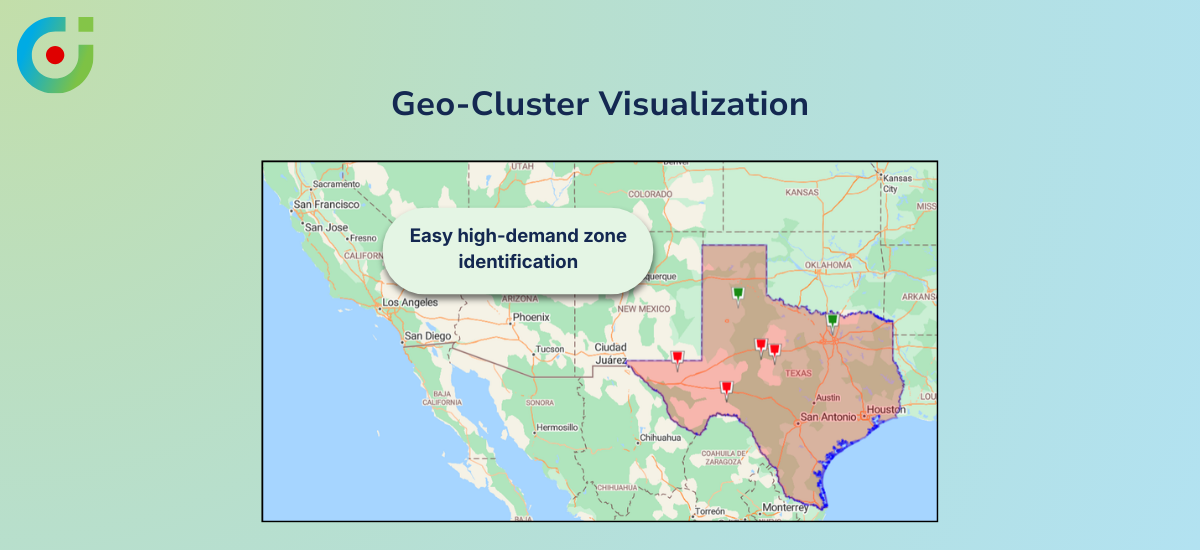
With Dynamics 365 map integration, organizations can implement cluster-based visualization where multiple delivery pins in the same geographic area group into cluster points on the map. High-demand zones become visually identifiable at a glance rather than something you’d have to dig out of a data report.
Teams can implement regional trend analysis on top of that, reviewing which areas see consistent activity over time and using that to inform longer-term conversations about warehouse coverage, territory restructuring, and resource allocation.
So you can allocate tasks accordingly, for instance, if one region shows clusters of pins, you will know that you need to send a team there, while one or two people can handle another whole region by themselves. It’s the difference between planning based on assumptions and planning based on patterns you can actually see.
Applying This Use Case with MappyField 365
MappyField 365 is AppJetty’s Dynamics 365 map integration solution, built specifically to run inside Dynamics 365 as a native extension — no external platforms, no data migration, no parallel system to keep in sync.
Organizations can implement the full range of capabilities discussed throughout this blog with this single tool. Map visualization of any Dynamics 365 record, multi-stop route planning with distance calculation and visual route comparison, territory mapping for delivery coverage, and cluster point analysis for understanding volume patterns geographically.
What ties all of it together is that MappyField 365 enhances manual planning with location intelligence. This means your team still makes the calls, but with considerably better information.
Business Outcomes
Organizations that implement Dynamics 365 map integration for warehouse-to-delivery planning tend to see the results in a few consistent areas. Planning cycles get faster because less time is spent manually interpreting address data.
Warehouse assignments improve because they’re based on geographic logic rather than habit. Delivery consistency improves across regions because territory structures are visible and maintained. And the overall quality of logistics decisions goes up when the people making those decisions can see what they’re working with.
Best Practices for Accurate Map-Based Planning
A few things tend to matter more than people expect when implementing map-based planning. The first is address data — if the records in Dynamics 365 have errors, inconsistencies, or outdated information, geocoding will reflect that. The map will only be as reliable as the data underneath it.
It’s worth cleaning up before treating the visual output as gospel. Delivery territories need to be revisited on a regular basis, too. What made sense six months ago may already be misaligned with where volume has actually gone.
Getting into the habit of comparing route options before anything is dispatched rather than defaulting to the first option that looks reasonable, makes a real difference over time. And it’s worth being clear internally that map integration is a planning tool, not an execution engine. The decisions still belong to your team.
The Map Was the Missing Piece All Along
The data needed for smarter warehouse-to-delivery planning is almost certainly already sitting in Dynamics 365. What Dynamics 365 map integration adds is the geographic layer that makes it usable. It turns address records into something a logistics team can actually see, compare, and reason about before decisions are made.
MappyField 365 brings that capability into Dynamics 365 without adding platforms or complexity. Better warehouse assignments, clearer territory structures, more defensible route decisions, and real visibility into delivery demand patterns for operations focused on planning accuracy and operational efficiency. It’s a practical and meaningful upgrade.
See how MappyField 365 can streamline your warehouse-to-delivery management.