When one thinks about the agricultural industry, the first few things that come to mind are the different types of fields across the region, shaped by weather, soil, and seasons. Yet many companies that offer agriculture-related supplies and services treat it as just another board meeting.
Their traditional marketing and sales tactics rely on generic knowledge of what farmers need, rather than on understanding which farmers need what. And no, it is not about creating an Excel sheet for every single individual, but about dividing the product and service offerings by geographical location, weather, and climate conditions.
If you are wondering why this happens, then the answer is their robust CRM combined with traditional processes. They have a sound management system (like Dynamics 365) in place and extensive geographical data, but the main issue is the disconnect between the two.
When teams can’t access the required, accurate information, they revert to their generic approach. It yields fewer results and requires more effort. So, how can this be improved? With the help of MappyField 365.
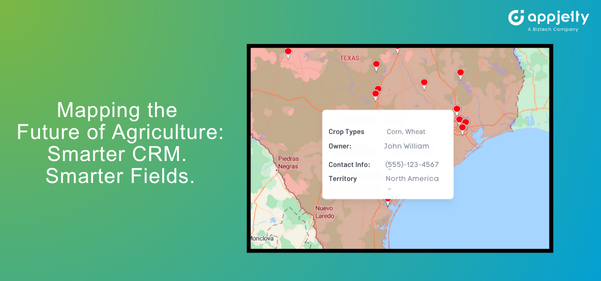
MappyField 365 offers a location-intelligent add-on for Microsoft Dynamics 365 for Agriculture, which completely changes the game. It transforms your Agriculture CRM from a static database into a live, visual planning tool.
Some of its advanced features include near-real-time visibility, route optimization, and territory-based data visualization. CRM maps are decision tools, especially in agriculture, where geography is strategy. And that’s what MappyField 365-CRM map integration can be for you, a resilient decision tool.
Five High-Impact Use Cases of MappyField 365 for Agricultural Success
MappyField 365 comes with a multitude of features that will help you map out a distributor network, assign territories to reps or partners, optimize routes, and so much more. Here’s a detailed picture of MappyField’s capabilities:
Use Case 1: Mapping Distributor Networks for Seed Distribution Based on Crop Data
Scenario:
A seed manufacturer wants to plan seasonal distribution aligned with crop cycles.
Problem:
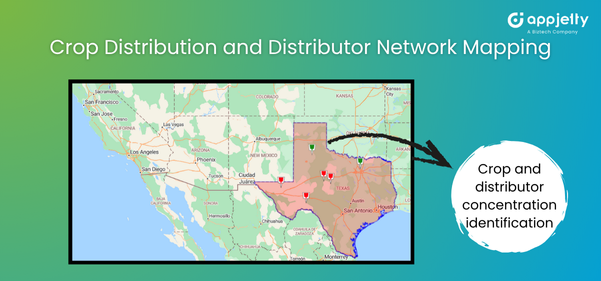
They can’t visualize agricultural regions on a map to understand where specific crops are concentrated. Their CRM lacks a spatial layer, making it difficult to target distributors in high-yield and high-demand zones.
How MappyField Helps:
By integrating MappyField 365 with Dynamics 365, you can implement data-driven map overlays that:
- Plot and identify crop distribution data by region.
- Highlight distributor proximity and potential expansion zones.
- Identify territories with the highest demand during specific sowing seasons.
This helps the manufacturers to strategically plan their distribution networks and avoid overstocking. The CRM map integration aids in pre-season planning, while route planning in rural areas facilitates on-time seed delivery.
Benefits:
- Better alignment of distributors based on crop data and demand patterns
- Optimized distribution efforts, reducing logistics costs
- Improved sales forecasts by focusing efforts on regions with high market potential
- Enhanced seasonal readiness through predictive geographic analysis
Many business owners ask us, “Why is it important to understand crop distribution before assigning distributors?”
Understanding the geographic spread of crops helps agri-businesses make data-driven decisions instead of relying on guesswork. With Microsoft Dynamics 365 for Agriculture and MappyField 365, you can visualize agricultural land on a map and identify crop-specific demand zones. This CRM map integration ensures the right distributors reach the right farms before planting begins, reducing overstocking or missed opportunities.
Use Case 2: Assigning Territories and Areas to Reps or Partners
Scenario:
An agricultural equipment dealer wants to assign fair territories to eight field managers.
Problem:
ZIP-code assignment causes overlap — some representatives handle hundreds of farms, while others manage just a handful. Without farming territory management in CRM, coverage is inconsistent.
How MappyField Helps:
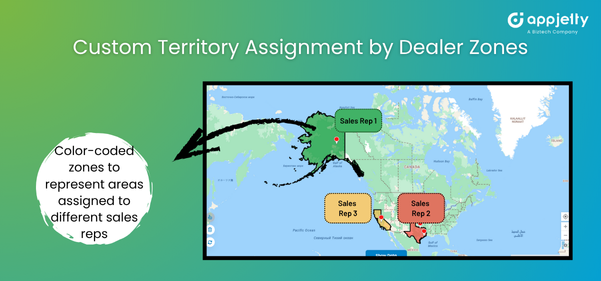
Within Microsoft Dynamics 365 for Agriculture, MappyField 365 can implement territory design using visual drawing tools:
- Draw polygons directly on the map.
- Assign territories in Dynamics 365 CRM to specific sales reps or dealers.
- View assigned vs. unassigned zones instantly.
- Color-coded segmentation ensures no two reps overlap.
Benefits:
- Balanced workload distribution.
- Transparent responsibility boundaries.
- Clear geographical area assignment in CRM for accountability.
Use Case 3: Route-Optimized Distribution Visits to Dealers and Distributors
Scenario:
A seed manufacturer runs seasonal distribution runs every planting season. Their goal is to maximize the number of dealers while ensuring on-time deliveries of products and marketing materials.
Problem:
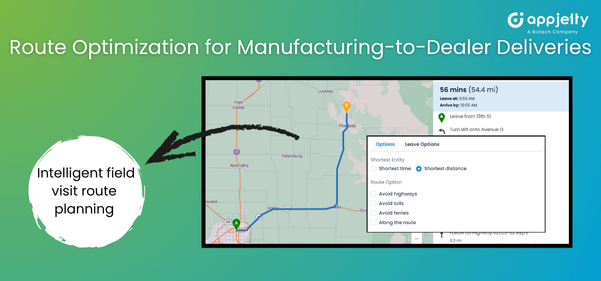
Without intelligent field visit route planning, drivers often retrace paths or miss key stops. Delays lead to missed planting windows, resulting in lost sales and damage to reputation. Peak season can significantly disrupt the fixed schedule, thus leading to stockouts.
How MappyField Helps:
MappyField 365 can implement smart route planning in rural areas by:
- Generating optimized multi-stop routes considering travel time and road type.
- Adjusting paths dynamically when new orders or cancellations arise.
- Providing turn-by-turn navigation and distance summaries.
- Allowing managers to monitor delivery progress on the live map.
Benefits:
- Reduced fuel and operational costs.
- Timely deliveries to remote distributors.
- Real-time coordination between sales and logistics.
- Improved SLA compliance during peak demand.
Route optimization for agriculture isn’t just about saving fuel — it also ensures supply reliability. By using field visit route planning in rural areas, you can create efficient delivery paths that ensure every dealer or distributor gets products on time, even when demand spikes.
The system adjusts routes for urgent orders, road delays, or cancellations, so trucks and reps follow the smartest sequence of visits. This kind of integration keeps your entire distribution network running smoothly, helping you avoid costly stockouts when farmers need your products the most.
Use Case 4: Planning Localized Campaigns Based on Geography
Scenario:
A fertilizer brand plans to promote a nitrogen-rich blend but only in regions where soil data shows a deficiency.
Problem:
Generic, mass campaigns dilute impact. Sending identical messages across all contacts wastes marketing spend and damages brand credibility.
How MappyField Helps:
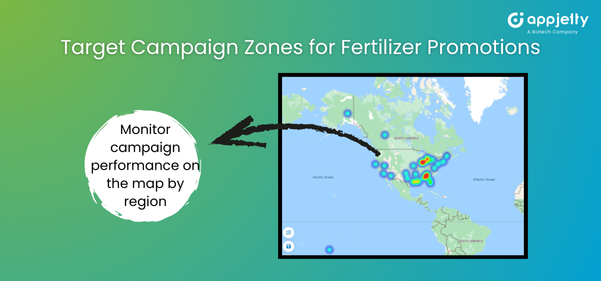
If your Dynamics 365 CRM stores metadata such as soil type, climate zone, rainfall pattern, or district information, MappyField 365 enables your team to visualize and segment those records directly on the map. With this map-driven segmentation, marketing teams can:
- Geo-segment CRM contacts by soil type, climate zone, or district (based on available CRM data).
- Build accurate, map-based segmented lists for targeted campaign planning.
- Export these contacts or add them to CRM marketing lists for localized email/SMS outreach via your marketing automation engine.
- Plot campaign engagement results on the map once the CRM stores engagement fields linked to each contact.
Benefits:
- Higher engagement and better-quality leads.
- More accurate demand forecasting aligned with climate and soil data.
- Better timing and relevance of campaigns based on sowing and rainfall cycles.
Many business owners also convey, “I always thought geo-targeting was mainly for digital ads. How does it actually help in agricultural sales campaigns?”
That’s a very common misconception. In agriculture, geo-targeting is much more than an online marketing tactic — it enables your team to reach the right farmers at exactly the right time. If your Microsoft Dynamics 365 already holds metadata such as soil type, climate zones, or district-level attributes, MappyField 365 transforms that information into actionable visual segments through map-based analysis.
You can export these filtered segments or convert them into marketing lists, enabling your marketing team to run localized agricultural campaigns tied to real environmental conditions.
For example, you can promote a nitrogen-based fertilizer only in areas where soil data shows low nitrogen levels. This kind of seasonal, data-backed sales push is precise, localized, and far more effective — making geo-targeting one of the strongest levers for agricultural marketing success.
Use Case 5: Monitoring Field Activities and Visit History on Map
Scenario:
A regional manager oversees multiple field reps spread across villages and needs to ensure they are visiting their assigned territories regularly.
Problem:
Spreadsheet logs or reports lack spatial verification. Managers can’t see which farms were visited, how often, or where gaps exist (which definitely exist).
How MappyField Helps:
Using farming territory management in CRM, MappyField 365 can implement:
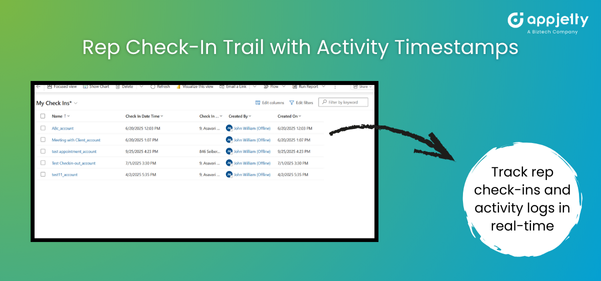
- Simplify tracking rep activity on the map via assigned route trails and day’s check-in logs.
- Visual differentiation between completed and pending visits.
- Historical visit data for performance reviews.
Benefits:
- Near real-time visibility based on check-ins, activity logs, and location sharing.
- Early detection of coverage gaps.
- Increased rep accountability and productivity
So every field visit, every dealer meeting, or delivery check-in can be seen by you instantly, giving you an idea about territories covered, missed areas, and visit frequencies. This is how MappyField helps turn supervision from guesswork into visibility, making it easier to ensure every farm, distributor, or retailer gets timely attention and support throughout the season.
Comparison Table: Traditional CRM vs. Map-Based MappyField Approach
| Feature | Traditional CRM | With MappyField 365 |
| Customer Location | Static addresses, no visual context | Interactive map views to identify clusters, gaps, and opportunities |
| Territory Assignment | ZIP code or state-based division | Custom territories based on agricultural conditions and logistics |
| Route Planning | Manual and time-consuming | Intelligent optimization with real-time adjustments |
| Campaign Segmentation | Fixed list-based campaigns | Geo-filtered targeting using soil, climate, and crop cycles |
| Activity Tracking | No real-time insights and static reports | Real-time, map-based visibility for field operations |
| Team Coordination | Phone/email follow-ups | Live CRM map integration showing rep activity in real time |
Ready for Location-Smart Agri Operations?
In agriculture, geography is more than a background variable. It’s the foundation of every successful marketing, distribution, and outreach decision. With MappyField and Dynamics 365, agribusinesses can adopt a smarter, more strategic approach. From a precise geographical area assignment to your ideal campaign segmentation, MappyField 365 can make all of it a reality.
MappyField brings the power of maps into the heart of your Agriculture CRM. It bridges the gap between digital planning and physical terrain, helping sales and marketing teams use Microsoft Dynamics 365 for Agriculture not just as a record system, but as a spatial intelligence engine.
Don’t just manage customers. Understand where they are, what they need, and when to reach them — with MappyField 365.