Effective resource management is the prime requirement for any business, whether it’s staff, equipment, or facilities. This is especially important for service sectors because their resource are the product. When an IT company bills its client, it charges for its expertise and time; a healthcare facility’s medical practitioners and equipment are its service.
You cannot save someone’s expertise or time for later, and if the resource is not available when needed, you lose the opportunity. This is what makes proper resource management a necessity. And, it is difficult to manage resources by yourself, especially if you don’t know where and how to begin.
Resource Management Challenges
The thing with these challenges is that, initially, they seem so minute that we don’t even notice them. It is only when they snowball into a bigger hindrance. To elaborate a little bit on the commonly seen challenges:
Overbooking and resource conflicts
Overbooking and resource-related conflicts are very common in workplaces that employ a legacy system to manage their resources. These companies use spreadsheets or a common group for updating resource booking details. But in this case, they are just one missed update away from conflicts.
The thing with manual updates is that humans sometimes forget, and while this may not happen every time, it often leads to double-booking, followed by confusion and tension. These conflicts not only waste time but also hinder collaboration.
Underutilization of Resources
Imagine spending a huge chunk of capital on a resource that nobody uses. Yeah, that’s what happens when you walk into the office and realize nobody is capitalizing on your investment. And it’s not like your staff doesn’t want to use it; they just don’t know it’s available.
Due to a lack of clarity about resource availability, even if the staff want to, they do not use the resource you spent so much capital on. This results in wasted capacity and high maintenance costs, as the machine is not being utilized to its full capacity.
Inefficient Scheduling Processes
If you are still using a decade-old email, spreadsheets and phone calls system, then it is not a reliable one at all. All it will take is one missed email or one forgotten spreadsheet entry for your “system” to crash.
When data is scattered and everyone works in silos, these minor gaps can escalate things exponentially. It can lead to rescheduled meetings and missed deadlines while you are still wondering how all of this happened.
Lack of Visibility and Communication
Another roadblock that results from scattered data is limited visibility. And when teams work in isolation, without any knowledge of other departments’ processes, it just feeds to miscommunication. With no way of knowing if the resource is free or not, projects often stall due to confusion and lack of clarity.
The most bizarre part is that the solution is right there; maybe the resource isn’t occupied at the moment, but nobody sees it. And, then the cycle continues to repeat itself, piling up the operational gaps, errors, and project delays till it’s beyond just a little fix.
Difficulty in Aligning Resources
All the above-mentioned pointers contribute to this one challenge. When you don’t have visibility of your resource utilization, it gets difficult to align their allocation with the project deadline. The result? Misaligned resource allocation, project escalation, and overtimes that could’ve been avoided.
The healthcare and IT industries will be most affected, as they cannot delay critical procedures or software launches. This makes it all the more necessary to implement a well-organized resource management system.
One of the commonly asked questions here is, “We’re already using Microsoft Dynamics 365—how can we fix our resource chaos without adding another complex system to learn?”
You can implement Calendar 365’s Resource Calendar as an extension of the existing Microsoft Dynamics resource management setup. Think of it as upgrading your Dynamics 365 environment with exceptional scheduling capabilities, so everything stays where your team expects it to be, minus the resource conflicts and confusion.
How Calendar 365’s Resource Management Calendar Can Help
Calendar 365 takes a straightforward approach to fixing resource management. It integrates seamlessly into your Microsoft Dynamics 365 environment and resolve all your resource handling challenges.
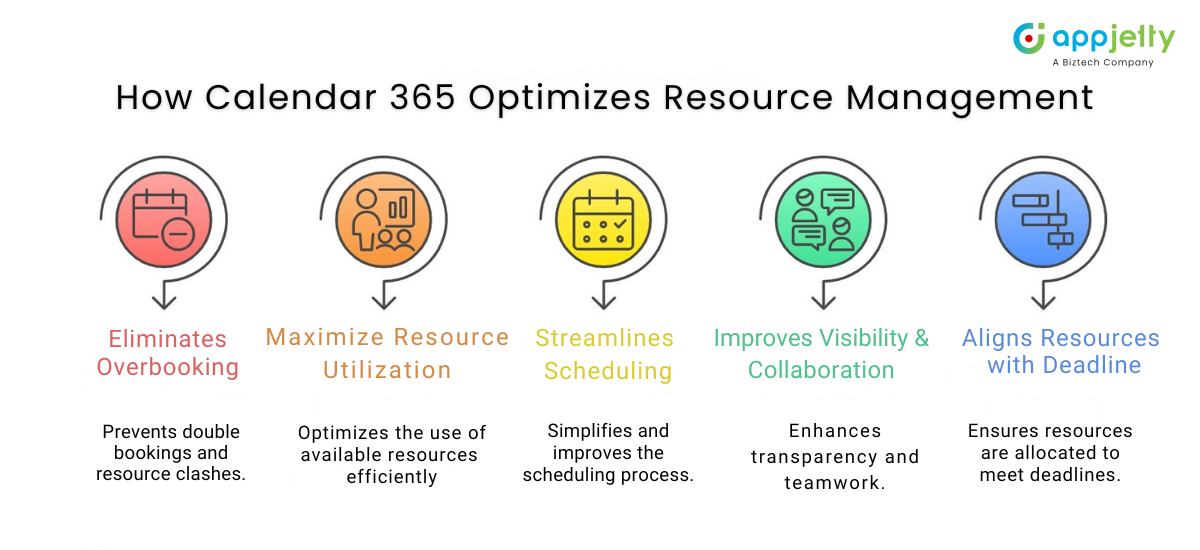
1. Eliminating Overbooking and Resource Conflicts
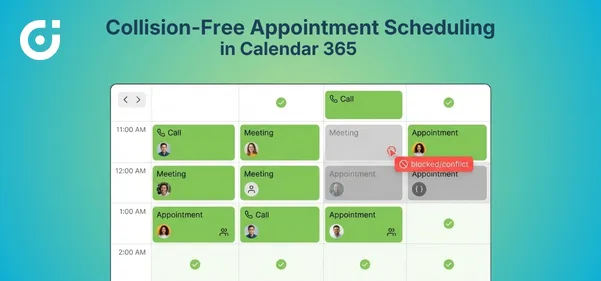
Problem: Consider a typical scenario in an IT firm where the dev team schedules their daily standup in Conference Room A, while the sales team books it for a prospect call. Neither department can see the other’s bookings. On the day of the meeting, you’ve got two groups standing at the same door, both showing their calendar invites to prove themselves right.
Solution: The Calendar 365’s Resource Calendar’s real-time visibility and a centralized view of all conference room booking statuses help mitigate this confusion. It will allow all the departments to see and book available conference rooms without the chaos of double booking conflicts.
Impact: Your resource scheduling software minimizes conflicts. Teams stop stepping on each other’s toes, productivity improves, and that conference room drama becomes history.
2. Maximizing Resource Utilization
Problem: Let’s take an example of a medical institution that just added a new MRI machine to its infrastructure. Everybody wants to use it, but no one knows when it is available. So nobody ends up using it. The new MRI machine with all the advanced features and functionalities ends up not being used at all, because nobody has the clarity.
Solution: Calendar 365’s real-time visibility will enable staff to see if and when the MRI machine is in use. So they can use the machine whenever it is available. This improves machine utilization, which in turn improves machine health and the healthcare facility’s operational capability.
Impact: Improved resource utilization increases operational efficiency. The medical staff can effectively share the machine without hampering anyone else, thus using the resource to its best capacity.
3. Streamlining Scheduling Processes
Problem: In an organization where sales and marketing teams are supposed to collaborate find themselves in a conflict when they accidentally book the same equipment. While, marketing team did update the Excel spreadsheet, the Sales team did not check it before booking the same resource. This is what manual scheduling and record-keeping lead to: miscommunication.
Solution: The Calendar 365’s Resource Calendar centralizes every scheduling from multiple departments and teams into one intuitive interface, which is directly connected with Microsoft Dynamics 365. So instead of your staff manually updating spreadsheets every time, the system will automatically update the schedule in real time. This will improve visibility and mitigate miscommunication.
Impact: It will considerably reduce the administrative burden and process chaos, replacing it with a data-driven, well-planned scheduling journey.
Want to see how AppJetty’s Calendar 365 can completely transform your resource management? See its advanced capabilities yourself before integrating.
4. Improving Visibility and Communication Across Teams
Problem: Continuing the previous example, let’s say the marketing team cancelled their equipment booking as their meeting got rescheduled, but the sales department has no idea. Thanks to information silos, neither of them used the equipment, even though both clearly needed it.
Solution: Calendar 365 puts visibility in your hands, minus the confusion. It lets you pull up exactly what you need, when you need it. Want to see resources by department? Done. Need a project-specific view? It’s there. Prefer weekly breakdowns over monthly? Your call. The system molds itself to your workflow, showing resource availability in a way that makes sense to your team.
Impact: It replaces information silos with transparency, thereby improving team collaboration and proactive communication.
5. Aligning Resources with Project Deadlines
Problem: Let’s say in a manufacturing company, two production teams need the same machinery on a short notice. But they don’t have clarity on when the other team will require the resource and accidentally book the same slot. Now, this will inevitably cause chaos and missed deadlines.
Solution: Calendar 365’s Resource Calendar’s effective resource allocation functionality can easily resolve this problem. It ensures that all required data is available to all teams in real time. This replaces guesswork with data-driven actions. Not just that, it also brings up all the data in one location, which allows your team to compare and look for alternatives in case of resource unavailability.
Impact: Correct resource alignment reduces the chances of missed deadlines, shortens the project timeline, and ensures none of the resources are overburdened with work.
Dynamics 365 Expert Tip: Maximize the impact of Calendar 365 by directly integrating key Dynamics 365 entities into calendar views. With this, your team can improve business activities, which in turn will reflect on decision-making capabilities. This will result in a more intelligent and unified scheduling experience for everyone involved.
Why Resource Calendar Essential for Effective Resource Management?
Calendar 365’s Resource Calendar eliminates friction between planning and execution, ensuring smoother project workflows and better resource utilization. It enables organizations to implement smarter scheduling, leading to improved productivity and reduced conflict, by helping them visualize their resource utilization schedule.
The result? Teams collaborate more effectively, thanks to streamlined resource management. This functionality transforms business operations by aligning resources with project needs, driving greater efficiency.
For organizations ready to start leveraging their resource scheduling software, Calendar 365 offers the practical solution that makes resource management feel effortless.