
Field service has never been easy, and it’s only getting more complex. Customer expectations are rising, technicians are already stretched thin, and managers are expected to keep operations running smoothly without always having full visibility into what’s happening on the ground. Sound familiar?
For teams operating within the Dynamics 365 field service ecosystem, these challenges are especially familiar and often harder to manage at scale.
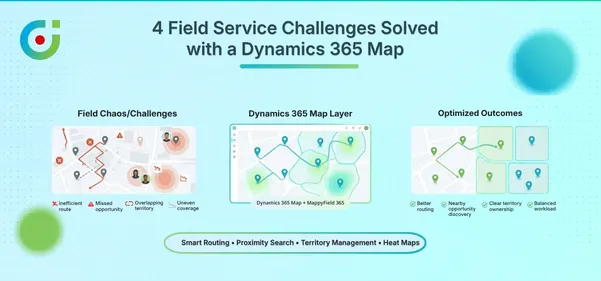
The data reflects this pressure. According to Aquant, 77% of service leaders struggle to find and retain qualified technicians, and the ones they do have are under more strain than ever. Whether you’re managing a small team or coordinating technicians across multiple regions, the challenges remain consistent. Travel delays impact productivity, inefficient scheduling leads to missed appointments, and limited visibility into field activity makes it difficult to stay in control.
Dynamics 365 Field Service provides the foundation for managing work orders, schedules, and field teams at scale. But the real impact comes from how effectively you use it.
In this post, let’s walk through how AppJetty’s Mappyfield 365 offers 10 practical ways to improve field service operations within Dynamics 365, from smarter scheduling to map-based dispatching and more.
From Scheduling to Routing — 10 Ways to Maximize Your Field Service Operations
These tips focus on the areas that matter most—whether you’re managing a team of five or fifty. AppJetty’s MappyField 365 helps you handle work orders and routes, manage territories, and track performance; even small improvements here can make a meaningful difference for your team.
Tip 1: Plan and Schedule Work Orders the Right Way
Reactive scheduling is a productivity killer. When work orders get assigned on the fly without any real structure, technicians end up with mismatched tasks, unbalanced workloads, and unnecessary delays.
The Dynamics 365 map lets you assign work orders based on technicians’ skills, certifications, and field workers’ availability. The result? The right person reaches the right job faster. Customers get quicker resolutions, technicians aren’t overwhelmed, and your SLAs stop looking like a wishlist.
Tip 2: Stop Wasting Time on the Road, Optimize Your Routes
Here’s a number worth thinking about: field technicians can spend most of their day just driving. That’s not service, that’s fuel money going up in smoke.
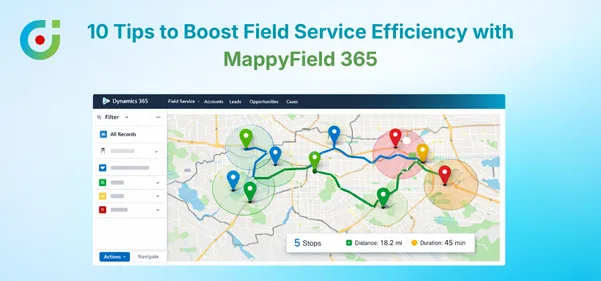
Route optimization in Dynamics 365 Map is one feature that will help you save a lot on travel time. Instead of your team members trying to figure out how to get from one place to another for five stops, this route optimization feature does this for you. Not only will this save your team on fuel costs, but it will also ensure they get more appointments in a day.
Tip 3: Make Smarter Dispatch Decisions with Map-Based Visibility
Dispatching without a map is a little like playing chess without being able to see the board. It can be done, but it’s not fun.
With the Dynamics 365 map view made available through MappyField 365, dispatchers can see where everyone and everything is at the same time. Rather than having to cross-check spreadsheets and call people to figure out who’s in the area, the answer is right in front of them.
This kind of clarity helps dispatchers make their decisions faster, eliminates the back and forth, and eliminates a tremendous amount of guesswork.
Tip 4: Build Service Territories That Actually Make Sense
When territories are defined poorly, some technicians end up drowning in work while others have half-empty schedules. That’s not just inefficient, it’s bad for morale.
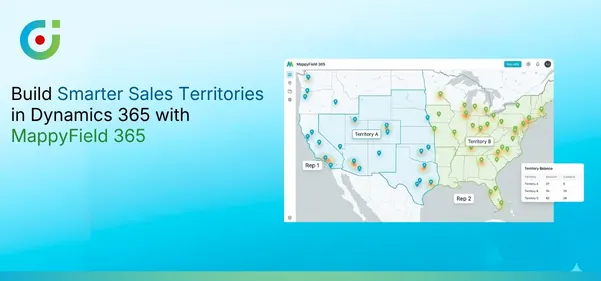
MappyField 365 makes it easy to define and visualize service territories using actual geographic data. You can draw regions based on workload, customer density, or location proximity, and then stick to them.
The result is more consistent coverage, fairer distribution of work, and a field team that isn’t constantly frustrated by overlapping or unclear boundaries.
Tip 5: Give Your Technicians Mobile Access, Seriously
If your technicians are still relying on the office to get job details or are completing paper forms to be completed by the end of the day, you’re not getting the efficiency you should be getting.
The mobile functionality of Dynamics 365’s field service allows the technician to have access to their entire schedule, customers, and jobs from their phone.
This also lets them mark jobs as completed immediately, take notes, and move to their next job without delay. Using these informations, their manager can plan their upcoming schedules.
Tip 6: Use Proximity Search to Fill Schedule Gaps
Cancelled appointment? Don’t just leave that time slot empty. Proximity search, as offered by MappyField 365, enables dispatchers to immediately identify nearby service requests or customers within a specific radius.
Rather than leaving a two-hour window idle, you can identify a nearby pending request and fill it in, without adding extra travel time. The result is a significant increase in daily visits over the course of a week.
Tip 7: Heatmaps Tell You Where the Work Is
Sometimes the most valuable insight isn’t what happened, it’s where it happened. The heatmap function in AppJetty’s MappyField 365 helps you visualize the density of service requests in your area. Areas with the highest number of service requests are highlighted in bright colors.
This makes it easy to spot which ones need faster service, are facing specific issues, or are experiencing high demand due to limited team capacity.
This isn’t just useful reporting; it can help you decide how to manage your resources in the coming weeks.
Tip 8: Build Flexibility Into Your Daily Operations
Even the most carefully laid-out schedule will reach an impasse at some point. A technician comes down with something. A task takes longer than expected. An urgent call comes in at 2 PM.
It is at this point that flexible replanning can make all the difference between a team that is resilient in the face of adversity and a team that comes apart at the seams. With MappyField 365, dispatchers have complete visibility into their technicians’ locations and activities, as technicians enter updates throughout the day.
This means that whenever something changes, dispatchers can quickly reassign tasks, reroute their technicians, and fit in urgent calls without upsetting the whole day.
Tip 9: Keep Customers in the Loop with Accurate ETAs
You can do everything operationally right and still leave a customer frustrated if they have no idea when someone will actually show up.
Dynamics 365 field service helps bridge the communication gap between your business and customers by providing accurate estimated times of arrival (ETAs). You can accomplish this by analyzing both your technician’s current location and route.
A customer who has a clear understanding of what to expect will be much more likely to forgive small delays in arrival time than a customer who has no idea when to expect their delivery; thus, providing customers with accurate ETAs is a small but valuable factor in overall customer satisfaction.
Tip 10: Measure, Review, and Improve, Consistently
You don’t optimize efficiency as a one-time exercise, and it’s not something you do once and forget about. It’s something you work on over time by constantly measuring and reviewing your processes. That’s why it is essential to focus on the metrics that actually matter, like time on site versus travel time, first fix rates, jobs completed per day, etc.
With Dynamics 365, you get the data, and with MappyField 365 field service, you get the geographic component of that data, so you can see not only that you have bottlenecks, but also where they are, and make the little changes that add up to make your operation much more efficient.
The Real-World Results of Getting Field Service Right
When field service operations are optimized with AppJetty’s Mappyfield 365, the impact is clear and measurable:
- Less time on the road, and more time actually serving customers
- Better technician productivity through smarter scheduling and routing
- Higher customer satisfaction thanks to accurate ETAs and faster response times
- Clearer operational visibility so managers can make informed decisions, not just reactive ones
These aren’t abstract benefits; they’re things field teams see within weeks of tightening up their processes.
Ready to Run a Smarter Field Service Operation?
The goal of field service optimization isn’t the use of one particular tool; rather, it encompasses creating an integrated system of various applications where scheduling, routing, dispatching, and communication must seamlessly interface with one another using a single source of real-time, timely, and accurate information (data) to allow for easier adaptation to changes in plans.
With Dynamics 365 Field Service in place, adding MappyField 365, AppJetty brings the location context that’s often missing. It gives your team a clearer, map-based view of operations, so planning, assigning, and managing work becomes more straightforward.
If you want to improve the performance of your field service operation, the most important question is when you’ll be able to start making better decisions based on location intelligence and data.
Ready to see what MappyField 365 can do for your Dynamics 365 field service? Check out the features and see what your team has been missing.