When you hear “manufacturing,” the first thought is that it relies on machines, materials, and production lines. But the reality is, it’s just the front of your business and not what is happening behind the scenes. So, the question is— what actually keeps everything on track?
The answer is, it is your calendar. You need to carefully plan your plant visits, vendor meetings, quality audits, equipment maintenance, distributor calls… which means appointments pile up fast. And somehow, all of them have to fit into schedules that already feel full.
Most manufacturers using Dynamics 365 appointment scheduling rely heavily on activities and calendars stored inside the CRM. The data is there. The intent is right. But teams often struggle with limited visibility into availability, working hours, and schedules across the organization. One department books a meeting without realizing production has blocked that slot for maintenance. Sales promises a plant walkthrough without checking whether the operations head is even on shift. There’s still manual checking involved, and that’s where issues creep in.
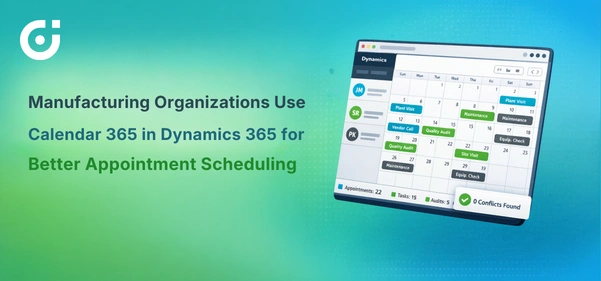
This is where the Dynamics 365 calendar experience needs an upgrade. Calendar 365 brings everything into one centralized, visual space inside Dynamics 365. In this blog, let’s break down exactly how it solves real scheduling headaches for manufacturing teams—and why it feels less like firefighting and more like actual planning.
The Core Problem: Limited Visibility into Appointments and Availability
Appointments do exist inside Dynamics 365 calendar. That’s not the issue. The problem is that they’re often scattered across individual user calendars. Each team member sees their own schedule, but no one has a clear, organization-wide snapshot. It’s like trying to assemble a production plan while only looking at one machine at a time.
Manufacturing teams struggle to see availability at a glance. Identifying scheduling conflicts becomes a manual task. Coordinating meetings between sales, operations, and field engineers feels like a mini negotiation every single time. People end up checking Outlook, CRM, spreadsheets, and sometimes even asking in chat, “Are you free at 3?”
This slows everything down. Manual cross-checking leads to delays, double bookings, and rescheduling effort that no one budgeted for. And in manufacturing, delays rarely stay small.
Centralized Calendar View Inside Dynamics 365
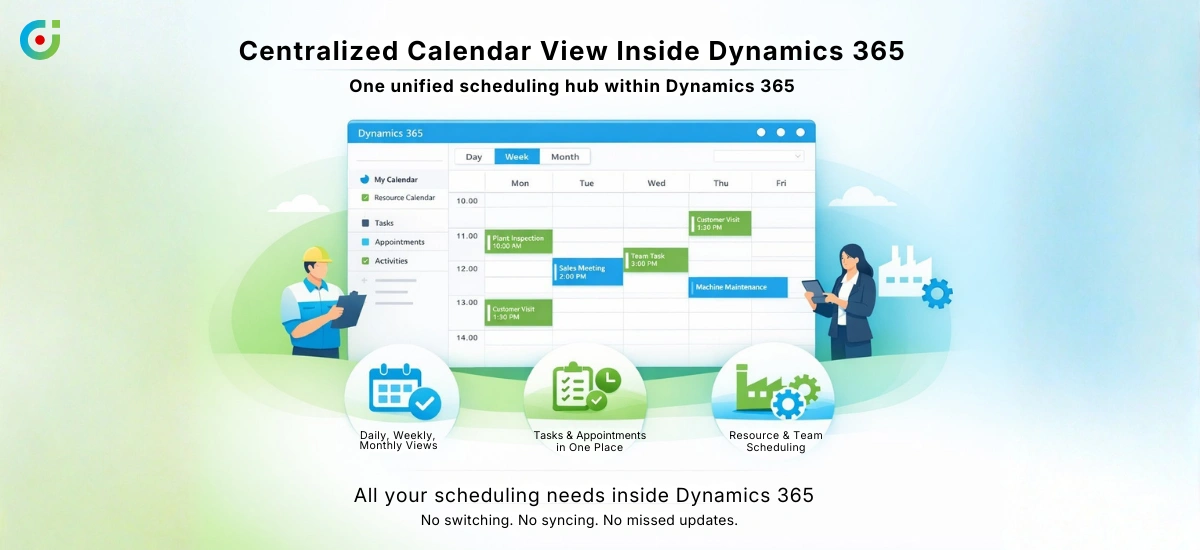
Calendar 365 introduces a unified calendar directly inside Dynamics 365. Instead of hopping between tools, users get a complete scheduling overview in one place.
Appointments, tasks, and activities are all visible in a single interface. Even resource calendars can be accessed without juggling multiple screens. The beauty lies in the simplicity—everything that matters to scheduling lives in one visual dashboard.
You can plan your schedule as per your convenience; switch between daily, weekly, or monthly views depending on how far ahead you’re thinking. This way your timeline and agenda views keep in loop without the grid overload. And the best part—everything stays inside the Dynamics 365 calendar. No exports, no sync chaos, and definitely no “Wait… did that update yet?” moments.
For manufacturing teams managing plant visits, inspections, or customer demos, that centralized clarity is a quiet game changer.
Availability-Based Appointment Scheduling
Here’s where things get practical. Calendar 365 shows availability for users and resources. That means you’re not guessing whether someone is free—you’re seeing it instantly.
Working hours for your team will be considered as per their clock-in and clock-out times, so what you see on the dashboard matches real life. If your plant supervisor’s shift ends at 4 PM, your customers won’t see an open 5 PM slot that sets your business up for a scheduling mistake.
Before anyone books anything new, the system already checks user availability and existing CRM appointments, so there is no double-booking or guessing who’s actually free.
This removes the awkward back-and-forth of “Does this time work?” emails. Now, your teams can confidently choose time slots that actually make sense. In manufacturing, where shifts and operational hours are strict, this level of visibility prevents scheduling mishaps before they happen.
With the Calendar 365, you pivot towards intelligent planning instead of chaotic back-and-fourth and avoid a mess of misunderstanding.
Discover how clearer scheduling helps production, sales, and plant managers stay aligned and avoid unnecessary coordination issues.
Preventing Double Booking and Scheduling Conflicts
Busy sales teams in manufacturing are constantly on the move—client visits, distributor meetings, internal reviews, and occasional “urgent” calls that appear out of nowhere. Scheduling conflicts are almost inevitable when visibility is limited.
Calendar 365 actively checks existing Dynamics 365 appointments during scheduling. If there’s an overlap, the calendar highlights the conflict immediately. No surprises later. No last-minute apologies.
This proactive conflict detection prevents overlapping meetings and unnecessary rescheduling. Teams maintain accurate and reliable schedules without constantly second-guessing themselves.
For manufacturing organizations, double booking doesn’t just mean inconvenience. It can mean missed plant walkthroughs, delayed approvals, or stalled deals. Preventing that upfront protects both time and reputation.
Creating and Managing Appointments in Dynamics 365
One concern teams often have is whether using a new calendar tool will create disconnected data. With Calendar 365, that worry disappears.
Appointments created through it are saved as native Dynamics 365 records. They can be created, updated, or rescheduled without breaking CRM workflows. Everything remains part of the existing system.
Activities stay linked to relevant CRM records such as Leads, Contacts, or Accounts. So if a sales rep schedules a factory demo for a prospect, that appointment remains tied to the opportunity. If operations schedules a quality audit, it stays connected to the appropriate account.
This ensures appointment data remains consistent, centralized, and usable for reporting. Manufacturing leaders can still track activity history and performance metrics without any extra reconciliation work.
It’s not a separate system. It’s an enhancement of what already works.
Custom Views, Filters, and User Preferences
Manufacturing organizations are rarely one-size-fits-all. A production manager doesn’t need the same calendar view as a regional sales head. Calendar 365 understands that.
Users can customize how they view schedules by filtering calendars based on team, business unit, activity type, or status. If you only want to see service-related appointments for the maintenance team, you can. If you want to focus purely on high-priority sales meetings, that’s possible too.
Color coding adds a visual shortcut. Different activity types can be identified instantly without reading every line. At a glance, you know what’s a client visit and what’s an internal review.
Admins also retain control. Settings and access can be managed based on roles, ensuring that sensitive schedules remain visible only to the right people.
It’s structured, but flexible—exactly how manufacturing processes prefer to operate.
Working Fully Inside Dynamics 365
You probably don’t notice how much time you lose switching between tools, but it adds up fast. With Calendar 365 built into Dynamics 365, you stay right where you are and keep moving. You can create or update appointments directly from your calendar view. If plans change, just drag and drop to reschedule. And when you need something for your meeting or shift briefing, you can print your calendar and bring it with you.
There’s no dependency on spreadsheets or external scheduling tools. Everything happens inside the CRM environment that teams already trust.
For manufacturing organizations aiming to streamline operations, keeping workflows consolidated is not just convenient—it’s strategic.
Business Outcomes for Manufacturing Teams
When visibility improves, scheduling conflicts drop. That’s the first noticeable change.
Manufacturing teams gain better oversight of team schedules. Double bookings reduce significantly. Appointment coordination becomes faster because availability is transparent. CRM appointment data becomes more reliable because it’s centralized and consistent.
Sales and marketing teams collaborate more effectively since they’re working from the same scheduling reality. Operations and field teams stay aligned without constant follow-ups.
It’s not flashy. It’s functional. And in manufacturing, functional wins every time.
Conclusion: Simplifying Scheduling with Calendar 365
For manufacturing organizations running complex, multi-touch sales processes, appointment scheduling isn’t a background task — it’s a direct reflection of how organized and reliable your team is to the outside world.
Calendar 365 doesn’t overhaul how you work. It just makes the scheduling part of your work significantly less painful by giving you centralized visibility, availability-based booking, and conflict prevention — all inside the Dynamics 365 environment your team is already using every day.
Which means fewer “sorry, can we reschedule?” emails. And honestly, everyone wins with that.
See how Calendar 365 can simplify your Dynamics 365 appointment scheduling and bring clarity to your team’s daily operations.