
Dynamics 365 provides sales and service teams with a solid foundation for managing relationships, tracking deals, and keeping daily operations moving. Appointments, follow-ups, resource allocation — it handles a lot. But as teams grow and booking volumes increase, one problem starts showing up with surprising consistency: scheduling conflicts.
When multiple people book against the same reps or shared resources without a single view of availability, overlaps happen. For example, a service visit gets confirmed for a slot that was already taken. By the time anyone notices, both parties have a confirmed booking, and someone has to make an uncomfortable call.
For busy teams, this is not a one-off situation — it becomes a recurring cost in time, trust, and missed opportunities. This is where collision-free scheduling in Dynamics 365 becomes something your operation genuinely needs.
That is exactly where AppJetty’s Calendar 365 comes in. It works inside Dynamics 365 and gives your team full visibility into availability before any appointment is confirmed. Meeting scheduling in Dynamics 365 stops being a guessing game — every booking gets checked, every conflict gets caught before it happens. This blog walks you through exactly how it works.
What Is Collision-Free Appointment Scheduling?
Collision-free scheduling means the system will not allow two bookings at the same time. Before any appointment goes through, the system checks what is already planned on the calendar and prevents a conflict from being created.
Think of a clinic where two patients get booked into the same doctor’s slot. The doctor cannot be in two rooms. Someone gets turned away, and someone has to make a call they would rather not make. The same thing plays out in sales and service teams more often than most managers want to admit.
Basic calendar blocking lets you mark time as busy and keep it that way. Conflict-free scheduling in Dynamics 365 does something different — it checks availability across users, resources, and teams before a booking is allowed. One is a label you apply manually. The other is a check that the system runs every single time.
Why Scheduling Collisions Happen in Sales & Service Teams?
Most scheduling conflicts do not happen because people are careless. They happen because the system allows them to. When your team is moving fast — handling leads, following up on deals, coordinating service visits — nobody stops to cross-check every calendar before dropping in a booking. And when there is no centralized view of who is available and when, overlaps are a matter of when, not if.
One of the most common causes is multiple people booking against the same rep at the same time. A sales manager slots a team call. A client books a demo through a separate link. Both land in the same hour. Neither person knew the other was booking, and the rep is now double-committed with no clean way out.
The problem gets worse when your CRM and calendar do not interact in real time. A meeting gets logged in Dynamics 365 booking management but does not reflect immediately on the rep’s calendar. Someone else sees the slot as open and fills it. By the time the conflict surfaces, both appointments are confirmed.
Buffer time is another gap that rarely gets built in by default. Back-to-back meeting scheduling in Dynamics 365 looks fine on paper until one call runs long, travel is involved, or prep time is needed before the next one. Without enforced buffers, the calendar fills up in a way that works on screen but breaks in practice.
These are not edge cases. They are daily friction points for any team running volume. And for that, your team needs a streamlined solution.
How Calendar 365 Prevents Scheduling Collisions?
Dynamics 365 booking management gives you the tools to stop conflicts before they happen. Here is how AppJetty’s Calendar 365 handles each layer of the problem:
Real-Time Availability Check Before Confirming a Booking
Before any appointment gets confirmed in Calendar 365, the system runs a live check across every relevant user and resource. It does not wait for someone to spot a clash after the fact. The moment a booking is being created, it checks what is already on the calendar and flags the slot if it is taken.
Your team is never working off stale data when they schedule. The check runs every time, without anyone having to manually verify. What you get is a confirmed booking you can actually trust, not one that needs a follow-up call to untangle.
Conflict Warning System — What It Looks Like and When It Triggers
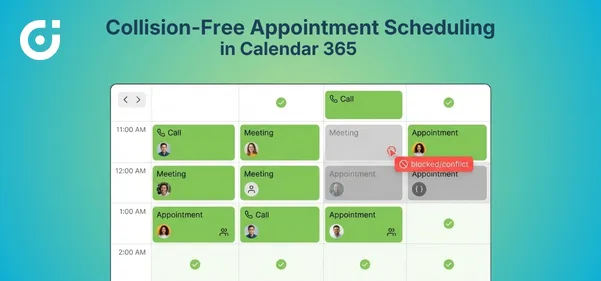
When a conflict is detected, Calendar 365 throws a warning before the booking goes through. It does not quietly overwrite an existing appointment or let two bookings share a slot without flagging it. The warning shows up right at the point of scheduling, giving whoever is creating the appointment a chance to pick a different time or person.
That is where collision-free scheduling in Dynamics 365 stops being a concept and starts being something your team actually feels day to day. No digging through calendars afterward. No uncomfortable calls to clients about rescheduling. The problem gets caught before it becomes one.
Working Hours Enforcement — Bookings Only Within Defined Hours
Meeting scheduling in Dynamics 365 only holds up when people are not getting booked outside the hours they actually work. Calendar 365 lets you set working hours per user or team, and those boundaries hold when any new booking comes in.
If someone tries to drop a call at 7 AM for a rep who starts at 9 AM, that slot does not show as available. No manual policing. Managers do not have to keep reminding people to check working patterns or time zones. You set the boundaries once, and the system keeps your Dynamics 365 booking management accurate every time an appointment is created.
Auto-Blocking of Already Occupied Slots
Once a booking is confirmed, that slot locks immediately. Nobody else can book into it, and it stops appearing as open to anyone scheduling after that point. This is a big part of how collision-free scheduling in Dynamics 365 with Calendar 365 works in practice.
The auto-block removes the gap that exists in systems where a slot stays visible until someone remembers to mark it manually. In teams where multiple people are booking against the same reps or shared resources, that gap gets exploited constantly. Closing it means two bookings cannot land in the same slot before either one is confirmed.
Sync With Outlook and Google Calendar to Avoid External Conflicts
A conflict does not have to originate inside Dynamics 365 to cause a real problem. Reps carry commitments in Outlook and Google Calendar that do not always make it into the CRM straight away. Calendar 365 syncs with both, pulling those external appointments into the availability picture before a new booking is created.
If a rep already has something on their Outlook, that time shows as blocked inside Dynamics 365 Calendar as well. Meeting scheduling in Dynamics 365 only gives you an accurate picture when everything is visible, including what sits outside the CRM. That sync is what makes the availability check genuinely dependable across your whole team.
Key Benefits of Collision-Free Scheduling for Teams
Getting scheduling right inside Dynamics 365 does more than just prevent calendar clashes. The effect runs through your entire team — how they plan, how they show up, and how clients experience working with them.
- No more double bookings. Every appointment goes through a check before it is confirmed. If the slot is taken, the system catches it before the booking lands. Reps stop getting pulled in two directions at once, and clients stop getting calls that begin with an apology.
- Better resource utilization. Accurate Dynamics 365 booking management means you can see real availability across your whole team. The right people get booked for the right things, slots stop going to waste, and capacity gets used the way it was intended.
- Improved customer experience. Nobody shows up expecting a meeting only to find out it was double-booked. Dependable meeting scheduling in Dynamics 365 is one of those things clients notice quietly when it works and loudly when it does not.
- Reduced admin overhead for managers. Fewer conflicts mean fewer reschedules to chase, fewer explanations to give, and less time sorting out calendar problems that could have been avoided at the point of booking.
- More predictable schedules for reps. Collision-free scheduling, Dynamics 365 gives reps a calendar they can actually plan around. Better preparation, steadier client conversations, and far less scrambling when the day does not go sideways unexpectedly.
When your scheduling is working the way it should, everything else your team manages day-to-day becomes much less chaotic.
Closing Lines
Scheduling conflicts cost more than most teams account for. Lost client trust, wasted rep time, and the back-and-forth of fixing avoidable mistakes all add up. AppJetty’s Calendar 365 handles this inside Dynamics 365 Calendar by checking availability in real time, blocking confirmed slots instantly, and syncing across external calendars so nothing slips through.
Collision-free scheduling in Dynamics 365 is not a feature you set up once and forget — it is the foundation of a scheduling process your whole team can rely on. If your team is still dealing with overlaps and last-minute reschedules, explore what Calendar 365 can do for your team today.